
In hope of removing this

Human - Machine Interaction
Washing Machine Interface Re-design
Washing Machine Control Panel
Focused on understanding user needs and pain-points of existing washing machine panels and solving it. The solution; a smart assisted knob panel that simplifies the user experience, reducing cognitive load by 75% and making the process of doing laundry more intuitive and straightforward.
Project Duration
3-4 Weeks
Tools Used


Role
Product Designer
.
.
.
Domain & Product understanding
Product Research
User Interview
User Research
.
.
.
.
Value mapping
Persona
Survey forms (digital+inperson)
Customer journey map
.
.
.
.
Heuristic evaluation
Information Architecture
User Flows
Feature lists
UI best practi
.
.
.
IdeationLow fidelity
High fidelity
Usability testing


.
.
After deep product, user & market research;
Problem Statement
Poor readability and the layout of the control panel,
complex output, along with the time consuming
navigation process is a confusing and tedious task which leads to people only using very few
features.

Low-fidelity
Conceptualizations
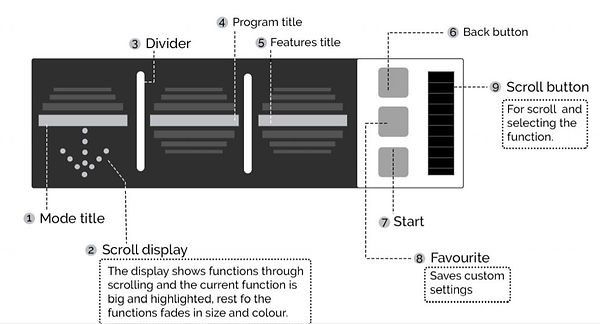
Concept A
The interface is designed for simplicity with fewer buttons, intuitive symbols, and a scroll button for hassle-free navigation. Programs and features are categorized in rows, enabling smooth sequential navigation. A dedicated button allows users to save and quickly access favorite settings, adding convenience. The divided display ensures clarity by clearly highlighting selected settings and programs.
Concept B
The washing machine panel features a round LCD display that showcases GIFs to visually illustrate specific cycles, simplifying user understanding. A rotating knob ensures seamless navigation, while step-by-step highlights guide users to set functions effortlessly. The innovative 'Download Cycle' feature lets users download custom programs via the internet and upload them to the machine using NFC, offering enhanced personalization and convenience.


Concept C
Having a multimedia display with highlighting buttons, and keeping the layout simple solves the issue of confusing symbols and inconsistent button arrangement. The mobile app enables flexibility of customer use and helps them to save time. The knob gives a painless navigation experience. Having a hi-tech feature like ‘voice talk-back’ simplifies the complex output and helps in having a better interpretation and conception.
Hi-fidelity
Conceptualizations
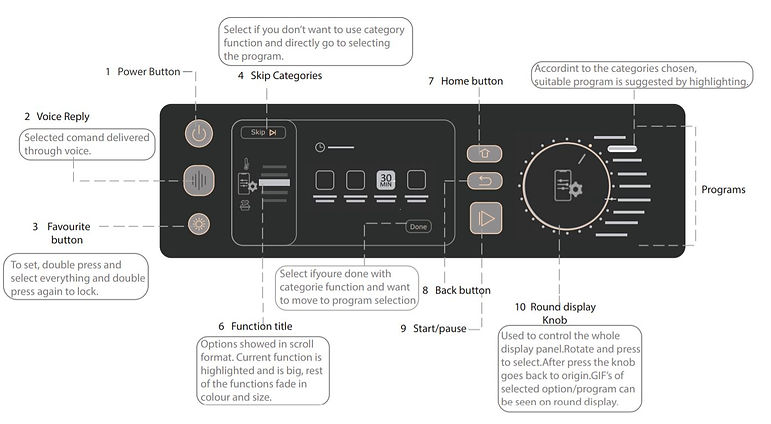
Concept 1
Concept 2

Easy Symbols
Effortless Navigations
Understandable sequence of buttons
Renders
Final Concept
Concept
An interactive modern panel with a knob that highlights functions as it is rotated and shows a GIF for each function so the user can understand the exact purpose of the function. There is a voice reply feature that gives a reassurance to the user about the function selected. Each button size has been selected and designed priority wise and has been given standard dimensions. Design your wash step by step.
Solution
Creating a control panel with crisp, easy symbols, understandable sequence of buttons, with all the necessary features, effortless navigating to all the programs & settings and clear, unambiguous output.
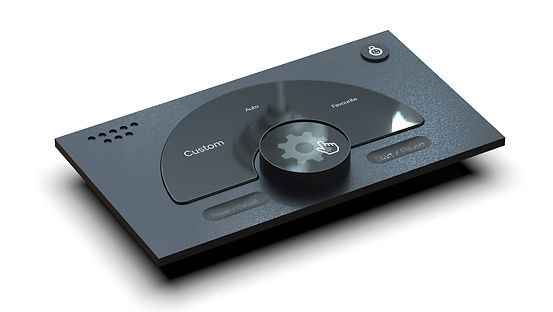
GIF on Washing Machine Knob

Feature List
.
.
.
.
.
.
.
Soak
Wash
Rinse
Spin
Eco
Normal
Speedy
.
.
.
.
.
.
Heavy Delicate Clothes Specific Weight Specific Time Specific Water Level Water Temp Child Lock Delay start
.
.
.
.
.
.
.
Customize button Automatic detergent dispenser Voice feedback Touch Display Highlighting Buttons Mobile Connectivity Download Cycle
Key Features

Rotate for navigation
Press to select

Step by step navigation

Favourite button; one press washing

GIF of feature on the circular display

App integration - smart wash

Scan the universal tag on your clothes to understand material.

Crisp, easy symbols
understandable sequence of buttons
effortless navigating
clear, unambiguous output
How is it better?


